
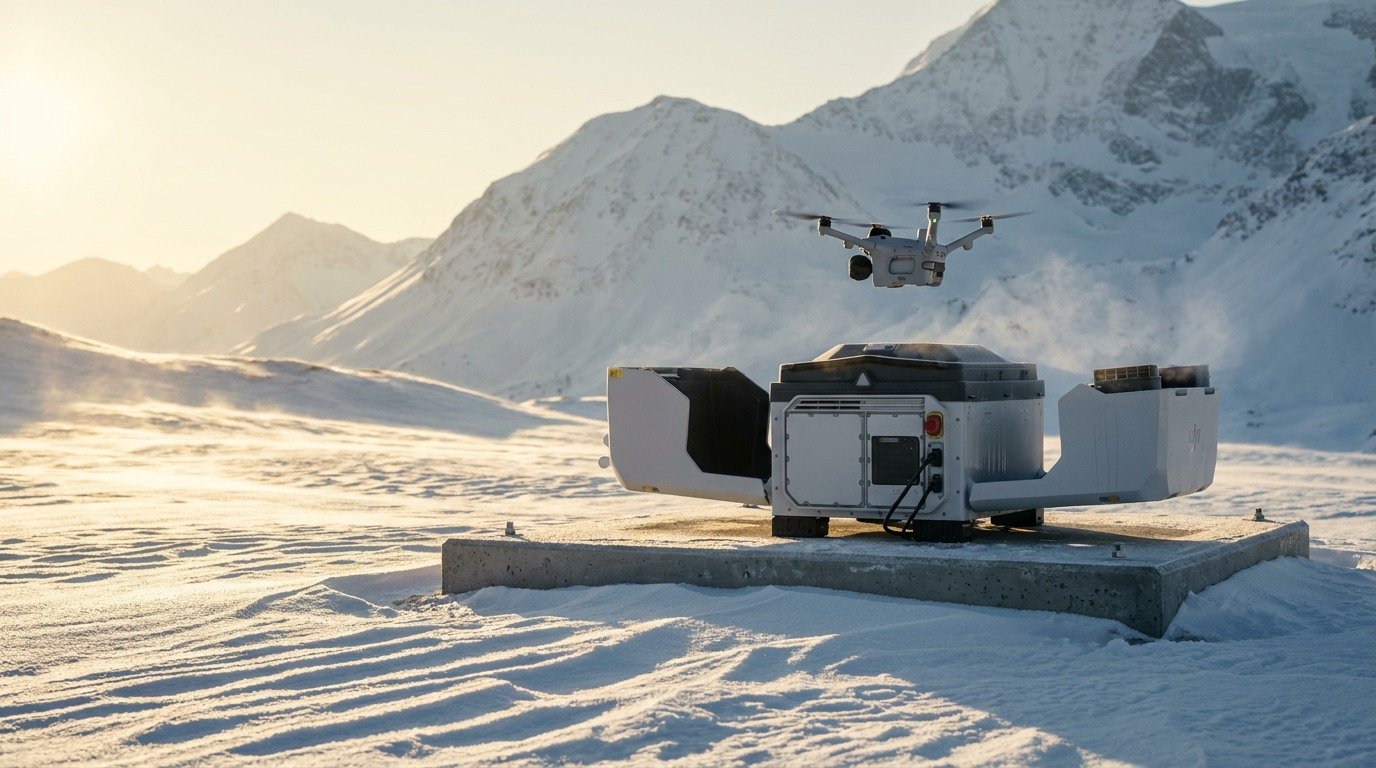
Transform Your Operations with Prisma’s DJI Dock 4 Solutions
Explore faster repeat missions with battery swapping, multi-sensor imaging and remote operations, delivered with Australian deployment support from Prisma Technologies.
The Future of Autonomous Aerial Intelligence

Fast Battery Swapping
Dock 4 replaces a depleted battery inside the dock, with about 45 seconds from landing to the next take-off.

Intelligent Operations
Plan, launch and supervise repeat missions with FlightHub workflows designed around a remote operations team.

Advanced Imaging
Wide, telephoto and thermal cameras provide different views for inspection, monitoring and response.

Built for Exposed Sites
The dock is rated IP56 and the aircraft IP55, and both work from −40°C to 50°C.

Connected System
An elevated O4 ground station and cellular options offer ways to plan reliable links across a site.

Data Delivered Faster
DJI lists up to 80 MB/s local Wi-Fi media offload during a swap. Cloud upload depends on the site connection.
Smarter Operations Powered by Prisma Tech’s Custom AI
Prisma can help turn the images and video from a repeatable mission into information your team can use.
- Explore defect detection, change monitoring or event alerts around your site's real images.
- Set a clear review step so the right person can assess each result and decide what happens next.
Our Process

Free consult
We start with a short discussion about your site, missions and goals.

Interactive Demo
We can discuss a demonstration when Dock 4 is available locally.

Tailored Setup
We scope the confirmed aircraft, dock, network and software configuration.

Licensing & Compliance
We help map your operation to the applicable CASA pathway.

Deployment & Integration
We assess the site and connect the system to your workflow.

Product Training
Your team learns the hardware, software and operating procedures.
DJI Dock 4
Dock 4 is home base for the Matrice 5TD. It keeps the drone safe between flights, swaps its battery and launches it for each mission.


- Battery swap
- New battery in 25 seconds, about 45 seconds between flights
- Media offload
- Up to 2 GB per swap, at up to 80 MB/s
- Weather rating
- IP56 rated, works from −40°C to 50°C
- Size and weight
- 66 kg, with a 0.41 m² footprint
- Weather station
- Checks conditions on site before every flight
- Mobile network
- Built-in dual 4G with two SIM slots
- Emergency stop
- A physical stop button on the dock itself
- Upgrading from Dock 3
- Sits on an existing Dock 3 concrete pad, but needs a new power cable
Hot swap batteries in 25 Seconds
Dock 4 changes the drone's battery by itself. There's no waiting for a recharge, so the drone can fly again about 45 seconds after it lands.
While it swaps, the dock copies up to 2 GB of photos and video off the drone over Wi-Fi, at up to 80 MB/s.
The dock holds up to three charged batteries and charges two at a time, from 15% to 95% in 27 minutes, so a charged one is ready for the next swap.
DJI tested the swap mechanism with 1,000,000 battery swaps across 300 test docks in beta testing.

It stays outside, whatever the weather
Dock 4 lives on site all year. The drone propellers are made from anti-icing material, and the weather station checks conditions before every flight.
- Dock
- IP56 rated
- Aircraft
- IP55 rated
- Operating temperature
- −40°C to 50°C
Speaker, Spotlight and Parachute on One Aircraft
The Matrice 5TD can carry three accessories at the same time. Fit a speaker, a spotlight and a parachute together, within its 450 g payload limit, and one docked aircraft can light up a scene, talk to people on the ground and fly with an extra layer of safety.
Speaker (AS2)
120 dB at 1 m, with push-to-talk, so you can give instructions or warnings to people on site straight from the operations room.
Spotlight (AL2)
11 lux at 100 m, with a beam that adjusts its width to follow the camera zoom. Light up a work area, a search zone or an incident at night.
Parachute (AP1)
Runs on its own flight termination system, separate from the flight controller. If something goes wrong it stops the motors, opens the parachute, and flashes a beacon and sounds a buzzer on the way down. It weighs 107 g, needs at least 35 m of height to deploy, slows the descent to 6 m/s or less, and is validated to the ASTM F3322 standard.
With all three fitted, there's no swapping accessories between missions. Night patrols, inspections and emergency call-outs can all run from the same dock.
Ask About AccessoriesAsk us about Australian pricing and availability for each accessory.


Fly Further with the O4 Ground Station
Pit walls, hills, buildings and tree lines can block the signal between the dock and the aircraft. The O4 Ground Station (O4GS) lifts the RTK, transmission and storage modules up on a mast, above ground-level obstructions, so the aircraft keeps a strong link further from the dock.
Coverage across large sites
Install more than one O4GS across a mine, farm or corridor. The nearest ground station carries the link as the aircraft flies its route.
High-gain RTK
A high-gain RTK module keeps positioning accurate, so repeat routes fly the same path every time.
Sub-2 GHz in Australia
Sub-2 GHz transmission is supported in Australia, giving a lower-frequency link that copes better with obstructions. It is switched on in FlightHub 2.
Several links, one stream
Dual-SIM 4G is built in, and live video can combine the O4 link and both 4G links into one stream, so it keeps playing if one connection drops. Video reaches the screen in about 160 ms.
Planning a Dock 4 site? We check terrain and line of sight during the site assessment, and tell you whether you need an O4GS and where it should go.
Transmission range in Australia depends on local radio regulations and site conditions.
DJI Matrice 5TD
Dock 4 is built around the Matrice 5TD. Its gimbal carries three visual cameras, a thermal camera, a laser range finder and a near-infrared illuminator. It can read a number plate from 400 m away and pick out a single screw from 100 m.
It flies for up to 59 minutes (about 48 minutes of real work), reaches 21 m/s to get to a target 3 km away in under 3 minutes, and recognises 17 types of target onboard, including people, vehicles, smoke, fire and livestock.

Cameras and sensors
- Wide-angle camera
- 50 MP, 1/0.98-inch CMOS, f/1.8, 23.5 mm equivalent
- Medium tele camera
- 50 MP, 1/1.28-inch CMOS, f/2.88, 3× optical zoom, 70 mm equivalent
- Super tele camera
- 50 MP, 1/1.5-inch RYYB CMOS, f/2.8, 11× telephoto, up to 176× hybrid zoom, full-colour night vision
- Thermal camera
- 1280 × 1024 (2560 × 2048 with super-resolution), f/0.85, 53 mm equivalent
- Laser range finder
- Up to 3 km, accurate to ±(50 cm + 0.1% of distance)
- Near-infrared illuminator
- Lights the scene for night vision without visible light
Built for flying out of sight
- Obstacle sensing
- Six full-colour obstacle cameras, plus LiDAR and millimetre-wave radar that stop the aircraft before it reaches a power line
- Flight termination
- Runs separately from the autopilot, so it can still stop the motors and deploy the parachute if the aircraft loses all power
- Weather
- IP55 rated, with anti-icing propellers
DJI Dock 4 Use Cases
A dock pays off wherever a site is large, remote or needs checking often. Here's where it makes the biggest difference.

Incident response
Launch from the dock within minutes of a call and stream live video to the people deciding what to do next. At night, the spotlight and speaker help light the scene and give directions on the ground.

Farms and large properties
Check water points, fences and stock across the whole property each morning, and use thermal at night to find animals or intruders.

Energy and infrastructure
Routine checks of lines, substations and solar farms.

Mine sites
Stockpile, pit wall and haul road checks every shift, without sending anyone in.

Thermal inspection
Find hot spots and heat faults that a visual check misses.
See a Dock Fly Before You Buy
The easiest way to understand a dock is to watch one work. Book a demo with our team and see a full flight from start to finish.
In the demo you'll see:
- The dock open and the drone take off by itself
- The flight planned and watched live in FlightHub 2
- The drone land back in the dock
- How it could work on your site
Bring your questions. We'll answer them on the spot.


Training and Support
Your team learns to run Dock 4 from the people who installed it, and you have a local team to call once it's flying.
- Operator training
- Hands-on sessions for pilots and control-room staff covering the dock, the Matrice 5TD and FlightHub 2
- Procedures
- Help setting up the operating procedures your CASA approval relies on
- Local support
- An Australian team in Wollongong to call when something needs attention
- Servicing
- Repairs, maintenance and DJI Care Enterprise plans for the dock and aircraft
Support for Site Planning, BVLOS, EVLOS & Regulatory Approvals
A dock can launch a repeatable mission, but the flight still needs an approved operating framework. Prisma can help scope your site, airspace, observer arrangements, communications and procedures alongside the hardware.
- EVLOS: A trained observer watches the airspace and related risks while the remote pilot operates beyond visual line of sight. CASA requires a ReOC, RePL and EVLOS approval.
- BVLOS: Where the remote pilot cannot maintain visual line of sight, CASA requires a ReOC, an appropriately qualified or supervised RePL holder, and a BVLOS flight approval.
The pathway and approval conditions depend on the operation. We can help you plan the deployment around those requirements before the system goes live.
Discuss Your Approval PathwaySee CASA's EVLOS and BVLOS guidance for current requirements.

Managed Dock Operations with CYBERNEST
No pilots or control room of your own? Our partner CYBERNEST can run your Dock 4 for you, from planning and approvals through to flying the missions and reporting the results.
Remote Operations Centre
Missions are flown from CYBERNEST's CASA-approved Broad Area BVLOS Remote Operations Centre (ROC).
Scheduled and on-demand missions
Routine inspections, security patrols and asset monitoring on a schedule, plus on-demand missions when something happens on site.
Approvals handled
CASA flight approvals, risk assessments and job safety reporting are managed in-house.
Live video on any device
Thermal and 4K video streams straight to your control room or security operations centre, and can be shared to any device, including phones, iPads and TVs.
Run on ORYNEX
Every mission is planned, flown and reported through ORYNEX, CYBERNEST's Australian-developed operations platform.
CYBERNEST holds CASA ARN 1228591, ReOC, AROC, EVLOS and BVLOS accreditations, and ISO 27001 certification.

Data Security & Enterprise Integration
We support implementation aligned to enterprise requirements, including the supply of DJI FlightHub 2 On-Premises licences for organisations that require greater control over data residency and infrastructure.
FlightHub 2 is assessed against ISO 27001 and the EU NIS2 directive, with full-link encryption, enterprise-grade audit logging and third-party security audits.
For customers requiring deeper system integration or bespoke platforms, DJI Cloud API access is available directly from DJI via a DJI Developer account. This enables organisations or their nominated technology partners to integrate third-party platforms with DJI Dock 4 operations, aligned to internal workflows and governance requirements.
Prefer an Australian-developed platform? ORYNEX
ORYNEX, developed by CYBERNEST, plans, dispatches and records dock missions in one place. Your team signs in through your existing identity provider (Microsoft Entra ID, Okta, SAML 2.0 or OIDC), with enforced MFA, role-based access for pilots, chief pilots and observers, and an audit log of every sign-in, dispatch and download. Live video and flight data are end-to-end encrypted, and flight records export as CASA-ready PDF, CSV and JSON reports.
Learn more about ORYNEXFAQs
How fast does DJI Dock 4 swap batteries?
The swap takes 25 seconds from the cover closing to the new battery going in. From landing to the next take-off, the full gap between flights is about 45 seconds.
Which drone works with DJI Dock 4?
Dock 4 is built for the DJI Matrice 5TD, covered in the section above. Talk to us before planning to reuse Dock 3 aircraft or accessories.
Can DJI Dock 4 operate remotely in Australia?
Yes, with the right CASA approvals. EVLOS and BVLOS each have their own operator, pilot and approval requirements, and the dock itself doesn't give you permission to fly. We can help you work out your pathway.
What is included in a Dock 4 package?
Every deployment is scoped to your site. Tell us what you need Dock 4 to do and we'll put together a quote covering the hardware, software, installation and training.
Can I request a demonstration?
Yes. Get in touch below and we'll arrange a time that suits you.

Get in Touch with Our Solutions Team
Whether you’re ready to deploy or just exploring the possibilities, we’re here to help. Ask a question, request pricing, or book a product demo — we’ll get back to you shortly.