
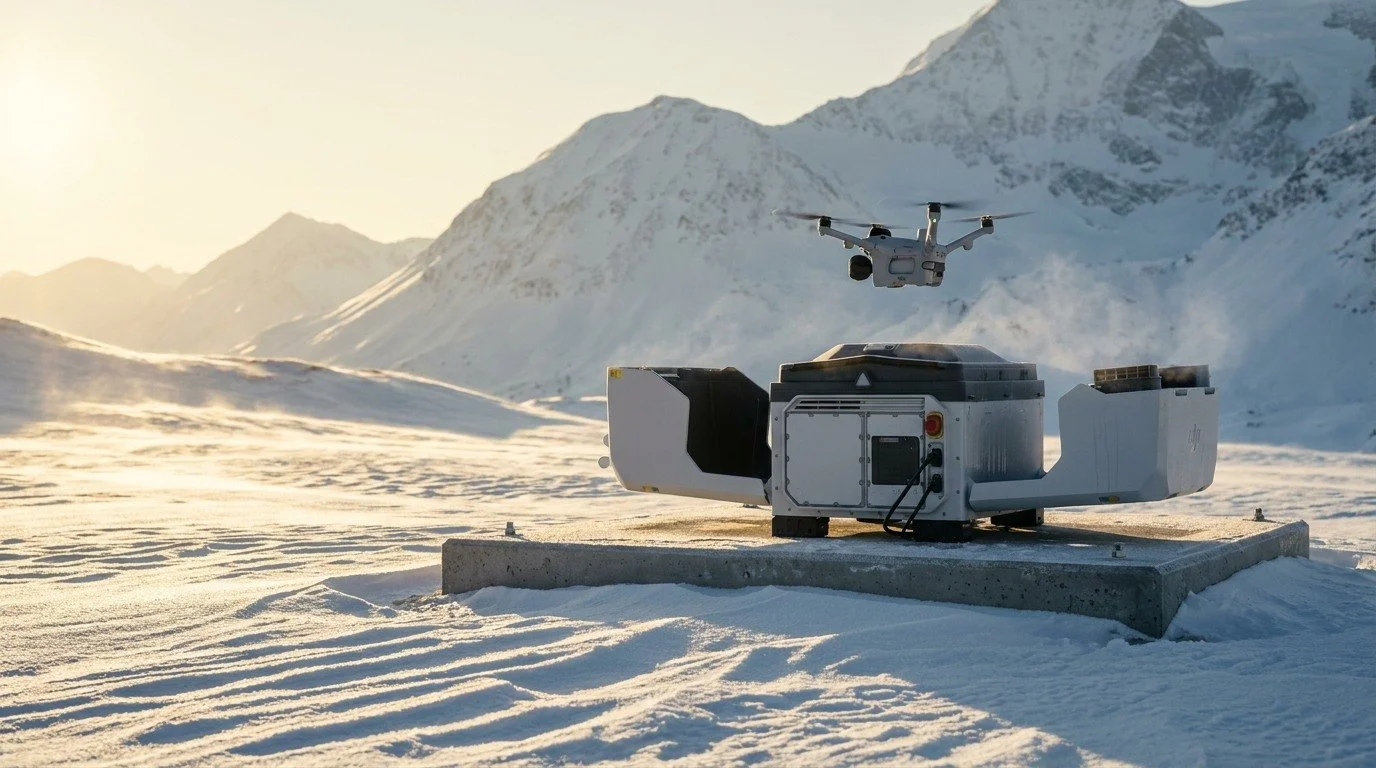
DJI Dock 4 swaps the drone's battery instead of waiting for it to recharge, so the aircraft is back in the air about 45 seconds after it lands. It pairs with the new DJI Matrice 5TD, which carries wide-angle, medium tele, super tele and thermal cameras, flies for up to 59 minutes and can fit a speaker, spotlight and parachute at the same time.
For inspection, security and response teams, that means more time in the air and less time waiting on the pad. The planning work moves to the site itself: power, network, O4 Ground Station placement and the approvals that let the system fly as often as your operation needs.
This guide covers the hardware, how O4 Ground Station roaming keeps the link strong across a large site, how the AP1 parachute works, what a Dock 4 installation looks like, and how Prisma helps you deploy it in Australia.
Prisma supplies, installs and supports DJI Dock 4 across Australia, from site assessment and O4 Ground Station placement to training and servicing. Contact us for pricing, lead times and a configuration for your site.
The short version
- Battery swap, not a recharge wait: 25 seconds from the dock cover closing to the new battery going in, and about 45 seconds from landing to the next take-off.
- Fast media offload: up to 80 MB/s over Wi-Fi, moving up to 2 GB of media to the dock during each swap.
- Matrice 5TD: up to 59 minutes of flight, 11× telephoto with up to 176× hybrid zoom, a 1280 × 1024 thermal camera (2560 × 2048 with super-resolution) and a 3 km laser rangefinder.
- Built for exposed sites: dock rated IP56, aircraft rated IP55, both working from −40 °C to 50 °C.
- Coverage across large sites: the O4 Ground Station lifts the link above obstructions, and roaming hands the aircraft between stations as it flies.
Battery swaps shorten the wait between missions
The key change is replacing a depleted battery instead of waiting for the aircraft to recharge in place.
The aircraft lands and aligns on the pad, the swap arm grips and removes the depleted battery, rotates, places it in the battery compartment and inserts a charged one. The aircraft is ready to fly again in about 45 seconds.
| Figure | What it means |
|---|---|
| 25 seconds | From the dock cover closing to the new battery going in |
| About 45 seconds | Aircraft turnaround, from landing to the next take-off |
| Up to 80 MB/s | Wi-Fi media transfer from the aircraft to the dock |
| 2 GB | Media transferred during a battery swap |
| 27 minutes | Charging from 15% to 95%, with two batteries charging at once |
The battery compartment has four bays. It holds up to three charged batteries and keeps one bay free for the battery coming off the aircraft. A swap only happens when the fresh battery is above 90% and holds at least 10% more charge than the one coming back, and swaps run when the aircraft lands, before an operation starts and one hour before a scheduled mission. Wireless charging is kept as a backup.
Dock 4 doesn't need a separate backup battery. If mains power drops, the batteries in the compartment back up the dock, so it can still swap and take off while more than two batteries are available.
DJI put the swap mechanism through 20,000 cycles in reliability testing, 300,000 lab cycles across five validation stages, and 1,000,000 battery swaps across 300 beta test docks in extreme heat, sub-zero cold, salt fog and coastal wind.
Where Dock 4 fits best
- Repeated inspections of the same assets
- Perimeter patrols that need frequent coverage
- Time-sensitive incident assessment
- Sites run from a remote operations team
- Organisations feeding imagery into existing systems
Plan these early
- Power supply and network at the site
- O4 Ground Station placement
- Battery inventory for your duty cycle
- Operational approvals and pilot supervision
- Data hosting, access and retention
Wide, telephoto and thermal views serve different jobs
The Matrice 5TD combines a wide view for context with medium and super telephoto cameras and a high-resolution thermal camera for closer assessment.
Dock 4 is built around the Matrice 5TD, which brings the mapping role of the Matrice 4D and the patrol role of the Matrice 4TD into one aircraft. The wide-angle camera uses a 50 MP 1/0.98-inch sensor at f/1.8 with a 23.5 mm equivalent focal length. The medium tele camera is 50 MP with a 1/1.28-inch sensor at f/2.88, giving 3× optical zoom at 70 mm equivalent.
11× telephoto with up to 176× hybrid zoom
The super tele camera has a 50 MP 1/1.5-inch RYYB sensor at f/2.8, with 11× telephoto and up to 176× hybrid zoom. The RYYB design lets in about 30% more light than a standard RGB sensor, giving full-colour night vision, and a near-infrared illuminator supports covert night work.
In practice, that means reading a licence plate from 400 m away or picking out a screw on a power line from 100 m. Wide + Zoom capture records the wide scene and the telephoto detail in a single shot.
Thermal at four times the resolution
The thermal camera is 1280 × 1024 at f/0.85 with a 53 mm equivalent focal length, four times the pixels of the Matrice 4TD. Super-resolution lifts it to 2560 × 2048. Thermal Fusion View layers heat over the visible image as picture-in-picture or MSX, with edge or overlay detail.
At night, the larger wide sensor, the RYYB telephoto and a 16× more powerful processor work together, merging frames at up to 20 Hz for 4K night video with a maximum night-mode ISO of 1,638,400.
Ranging helps locate observations
The laser rangefinder measures up to 3 km, accurate to ±(50 cm + 0.1% of the distance), so a target on screen becomes a position on the map.
More time on target
The Matrice 5TD flies for up to 59 minutes, with about 48 minutes of practical operating time per flight. In FlyTo mode it reaches 21 m/s, getting to a target 3 km away in under 3 minutes. It also recognises 17 target types onboard, including people and vehicles (filterable by colour), smoke, fire and livestock.
Visual cameras for daytime inspection and thermal with RYYB night vision for after-dark patrols mean the same docked aircraft can cover both day and night work.
The O4 Ground Station keeps the link strong across the site
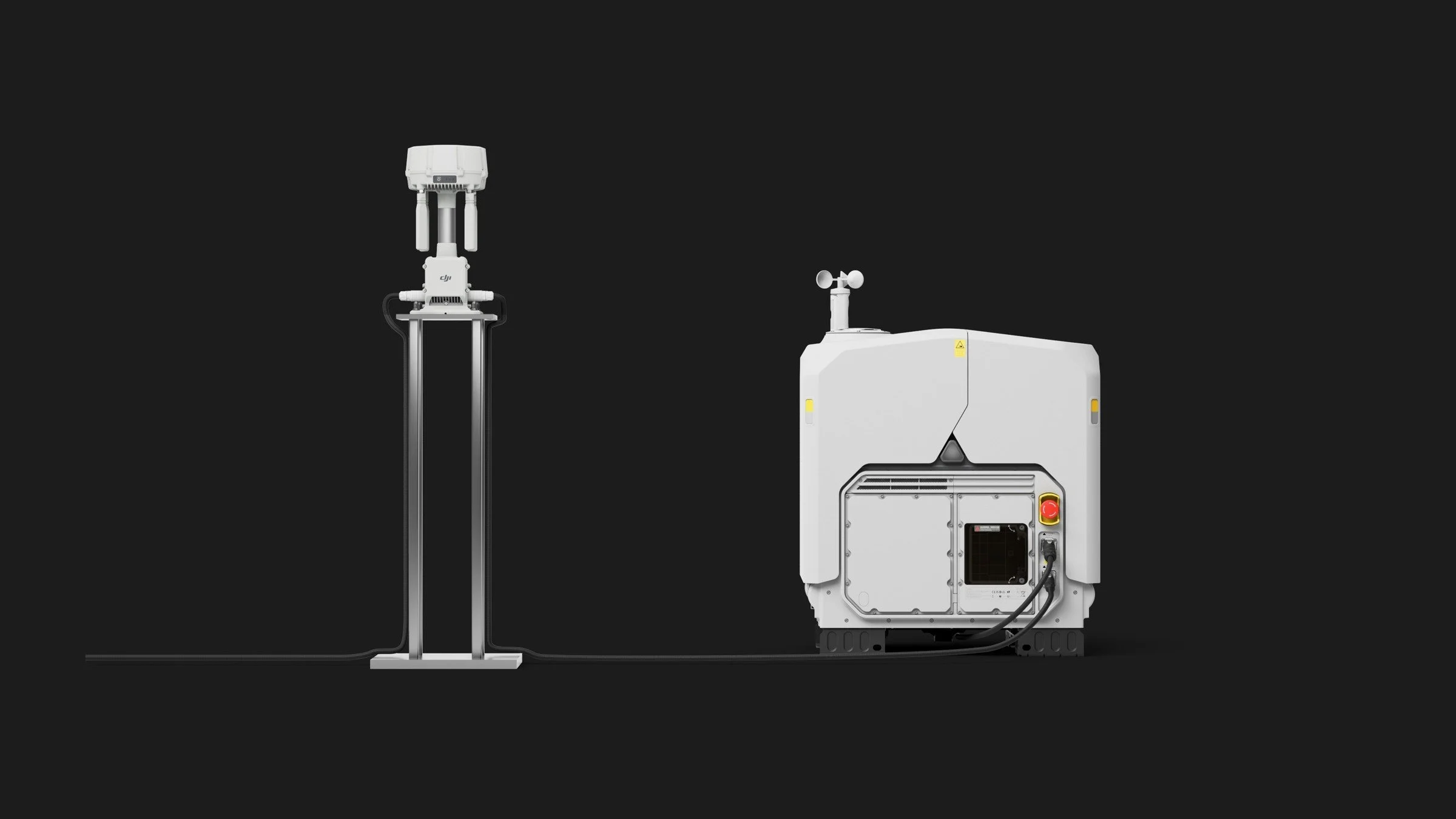
Dock 4 moves the RTK, transmission and storage modules out of the dock and into the O4 Ground Station, which sits up on a mast above ground-level obstructions.
Lifting the link above buildings, pit walls and terrain gives a clearer line of sight and a longer reach. The O4 Ground Station tracks 5 satellite systems across 19 frequencies for interference-resistant positioning, and sub-2 GHz transmission is supported in Australia once it is switched on in FlightHub 2 device management.
Roaming between ground stations
Roaming lets several O4 Ground Stations work together, much like mobile phone towers. The first station connects to Dock 4 in dock access mode, extra stations run in roaming mode, and the aircraft hands over to the nearest station as it flies its route.

- Dock access mode: the first O4 Ground Station connects to Dock 4.
- Roaming mode: add more stations to extend range across the site, with an internet connection.
- Relay mode: extend range without an internet connection, for off-grid sites.
- Place each O4 Ground Station using the signal map, targeting weak spots and blind zones.
- Calibrate every station from the same RTK source as the dock, using Custom Network RTK with identical settings. Manual calibration won't work.
- Each station serves one aircraft model at a time, selected in FlightHub 2 device management, and one aircraft connects to one station at a time.
- Turn roaming on before take-off. It can't be enabled in flight.
Cellular backup and link fusion
The aircraft has a built-in dual 4G dongle with two nano-SIM slots. Fitting SIMs from two different carriers gives a second path if one has poor coverage over your site. Link fusion combines the O4 link and both 4G links into one stream, so live video keeps playing if one connection drops, and signal-quality indicators show which part of the path is weak.
Video is encoded in H.265 on the aircraft and streamed straight to the cloud, with the dock passing it through without re-encoding. That gives the same picture quality at roughly half the bitrate, about 32% lower live-stream latency and a sky-to-screen delay of about 160 ms.
Transmission range depends on local radio rules, terrain and station placement, so we plan coverage from your site's signal map. Radio reach does not authorise BVLOS flight; that still needs the relevant CASA approval.
Built for exposed sites
The dock is rated IP56 and the Matrice 5TD IP55. Both operate from −40 °C to 50 °C, the propellers use anti-icing materials, and the system handles take-off, landing and operations in winds up to 12 m/s. The dock works at altitudes up to 5000 m.
A deployment plan should still cover drainage, recovery access and the weather limits you set for launching each mission.
Layered safety systems
The Matrice 5TD has a built-in obstacle-sensing module that combines LiDAR and millimetre-wave radar and stops the aircraft before it reaches a power line, with no extra radar to mount. Six full-colour obstacle-sensing cameras give all-round sensing day and night, and real-time altitude alerts trigger the moment the aircraft passes its authorised height.
Parachute and independent flight termination
The AP1 parachute and the Matrice 5TD's built-in flight termination system (FTS) bring the aircraft down under control if something goes wrong.

How it works
- Trigger: a manual trigger from FlightHub 2, an anomaly detected by the aircraft, or a geocage breach when the aircraft leaves its contingency area.
- Motor stop: the FTS stops the motors immediately.
- Deploy: the parachute opens.
- Alert: a beacon flashes and a buzzer sounds on the way down.
- Final pin: the landing position is pinned so the team can recover the aircraft.
The FTS is built into the Matrice 5TD airframe as standard, with no separate module to install. It runs separately from the autopilot, so it can still end the flight after a total loss of aircraft power, and it needs at least one 4G SIM card.
AP1 parachute specifications
- Weighs 107 g, to keep the impact on flight time small
- Needs a minimum deployment height of 35 m above ground level
- Slows the descent to 6 m/s or less
- Validated to ASTM F3322 through more than 45 deployment tests in hover and full-speed flight
- No factory inspection needed for three years if self-tests pass
- Replaced with a new unit after any deployment
- Connects directly to the aircraft's high-speed USB-C port
The parachute fits alongside the AS2 speaker (120 dB at 1 m, with push-to-talk) and the AL2 spotlight (11 lux at 100 m, with a beam that follows the lens), all within the aircraft's 450 g payload. In Australia, the parachute supports your safety case and works alongside your CASA approvals rather than replacing them.
What a Dock 4 installation looks like
A Dock 4 site needs power, a network connection, an O4 Ground Station and a short set-up flight before the first mission.

- Device connection: connect FlightHub 2 over the internet to a router, and the router to the O4 Ground Station by PoE. The O4 Ground Station connects to the dock by PoE over a run of less than 80 m and sits within 40 m of the dock, in dock access mode. The dock is set up from the Android version of the DJI Enterprise App over USB-C.
- O4 RTK convergence: let the O4 Ground Station's RTK settle on a fixed position.
- O4 location calibration: calibrate the station's position.
- Dock and Matrice 5TD binding: bind the aircraft to the dock.
- Insert batteries: load the charged batteries into the dock's battery compartment.
- Entry and exit route: the aircraft takes off, climbs, flies a square route recording its position and builds a SLAM model around the dock, then lands. The route is saved and guides every future take-off and return.
Site requirements
- Power supply rated above 2200 W
- Internet connection to FlightHub 2
- O4 Ground Station within 40 m of the dock
- Room for a 66 kg dock with a 0.41 m² footprint (a two-person lift)
Upgrading from Dock 3
- The Dock 3 concrete base and mounting holes can be reused
- Dock 4 uses an LP25 power cable, so Dock 3 cables don't fit
- The O4 Ground Station is required, as RTK has moved out of the dock
- The DJI Power 1000 mini isn't supported
Remove the AP1 parachute before setting an alternate landing point or the entry and exit route.
Plan the data workflow alongside the flight
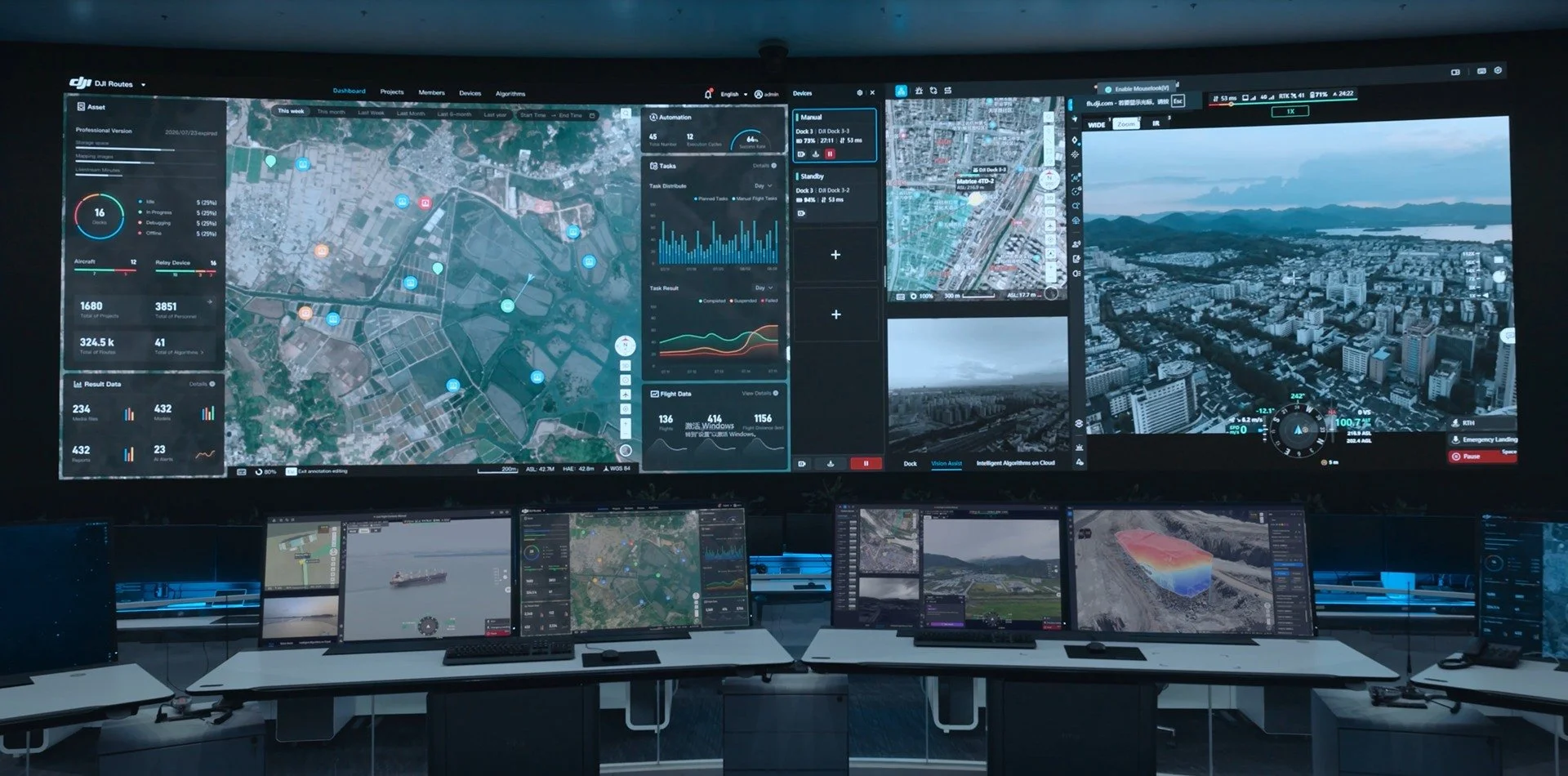
Dock 4 runs through DJI FlightHub 2, from mission planning to live viewing, media retrieval and integration with other business systems.
FlightHub 2 brings DFR automated dispatch for emergency response, FH Sync and OpenAPI 2.0 for third-party platforms with more than 200 open API endpoints, Analyzer Pro for detecting site changes and calculating target coordinates, and FH Copilot for creating routes, configuring workflows, controlling flights live and generating reports. The DJI Enterprise App puts live streams, Dispatch Me, annotations and the task calendar on a phone, so field staff can request a flight and watch it without sitting at a computer.
Give every observation a destination
Define who reviews a live stream, which images become inspection evidence and how an observation reaches a maintenance or response team. A successful flight has limited value if nobody receives the information in a usable form. Pin any point on the map in FlightHub 2 and it retrieves every photo taken of that spot.
For critical infrastructure, involve IT early. FlightHub 2 is assessed against ISO 27001 and the EU NIS2 directive, with full-link encryption, enterprise-grade audit logging, third-party security audits and data kept where you decide. FlightHub 2 On-Premises keeps data on your own servers, and a cluster deployment adds automatic failover, load balancing and scheduled backups for mission-critical fleets of more than 20 device licences.
Copilot and onboard AI
FH Copilot turns a plain-language request into a route or workflow, checking speed, altitude, collision risk, wayline validity and hardware compatibility before it builds anything. Its AI features sit in separate entry points, stay off unless a user triggers them, and always show which results are AI-generated. User data is not used to train the AI without authorisation.
Onboard AI recognises 17 target types on the aircraft itself, with no cloud round trip: people and vehicles filterable by colour, smoke and fire, livestock, and vehicles from sedans and buses to excavators and forklifts.
Prisma's custom AI services build on this for a defined problem, such as reviewing inspection imagery or classifying observations. We agree on representative data, an acceptance test and the system that receives the result before committing to an integration.
Repeated inspections are the clearest starting point
The strongest use cases have a recurring observation task and a clear action attached to the result.
Energy and infrastructure
Run repeated visual and thermal inspections from consistent viewpoints. In DJI's Dock 4 program with Osprey Integrity at oil and gas sites in northern Alberta, pipe rack and tank roof checks dropped from hours to about 20 minutes, compressor site checks from a full day to about 10 minutes, and pump jacks took 2 minutes each. Explore Prisma's infrastructure solutions.
Mining and industrial sites
Perimeter checks, asset observation and incident assessment across large sites. O4 Ground Station roaming carries the link across pits, stockpiles and haul roads, and the IP56 dock and IP55 aircraft handle dust and weather. Explore mining and resources applications.
Public safety and response
DFR dispatch sends the nearest dock from a flight request, streams live video to the coordinator and field team, and supports customisable police-style red and blue lights. Drone Action 360 in Canada validated Dock 4 over more than 2,000 flights and 400 flight hours from its 24/7 remote operations centre, and the Wikwemikong community in Ontario flew 17 missions in one day from a single Dock 4. Explore public safety solutions.
Construction monitoring
Repeated imagery supports site-progress reviews. Flying nadir or oblique mapping missions at 120 m with 12 MP images, the Matrice 5TD achieves aerial triangulation check-point accuracy of around 10 cm. Explore construction and surveying solutions.
Scope the deployment with Prisma
Begin with a consultation covering the site, mission frequency, required imagery and existing systems. We use that scope to plan a demonstration, configuration, installation, integration work and operator training.
Installation, regulatory support, custom AI development and maintenance are scoped individually for each site.
Remote operation needs an Australian operating pathway
Automated launch, flight and recovery do not remove pilot responsibility or CASA requirements.
For BVLOS operations, CASA lists a ReOC, an appropriately qualified or supervised RePL holder, and a BVLOS flight approval among the requirements. Scope the operating area and approval pathway alongside the installation. Read CASA's BVLOS requirements.
Night operations require the relevant credentials, training, risk assessment and documented procedures. Eligible operators can follow CASA's prescribed procedures and instrument; alternative procedures may need approval. Check CASA's night-operation guidance.
Build pilot supervision, weather decisions and lost-link responses into the workflow. Decide who can stop a mission and who attends the site when a remote reset is insufficient. Dock 4's independent FTS, parachute and real-time altitude alerts give you strong building blocks for that safety case.
DJI Dock 4 and Matrice 5TD key specifications
The figures that matter most when planning a Dock 4 site.
- Battery swap
- 25 seconds, cover close to insertion
- Turnaround
- About 45 seconds, landing to take-off
- Charging
- 27 minutes, 15% to 95%, two at once
- Media offload
- Up to 80 MB/s over Wi-Fi · 2 GB per swap
- Dock weight and footprint
- 66 kg · 0.41 m²
- Operating temperature
- −40 °C to 50 °C
- Ingress protection
- Dock IP56 · Aircraft IP55
- Max wind
- 12 m/s
- Max flight time
- 59 minutes (55 minutes hover)
- Max speed
- 21 m/s in FlyTo
- Super tele camera
- 50 MP · 11× telephoto · 176× hybrid
- Thermal camera
- 1280 × 1024 · 2560 × 2048 super-resolution
- Laser rangefinder
- Up to 3 km
- Aircraft battery
- 260 Wh · 925 g
Source: DJI Dock 4 and Matrice 5TD product information, October 2026.
DJI Dock 4 questions, answered
Quick answers to the questions we hear most.
Is DJI Dock 4 available in Australia?
Yes. Prisma supplies DJI Dock 4 in Australia, with site assessment, installation, training and local support. Contact us for pricing, lead times and a configuration for your site.
Which drones work with DJI Dock 4?
Dock 4 works with the DJI Matrice 5TD, which brings the mapping role of the Matrice 4D and the patrol role of the Matrice 4TD into one aircraft.
Can I reuse my Dock 3 installation for Dock 4?
Partly. Your Dock 3 concrete base and mounting holes can be reused. Dock 4 uses a different LP25 power cable, needs a power supply rated above 2200 W, and needs an O4 Ground Station because RTK has moved out of the dock.
Does DJI Dock 4 swap batteries in 25 seconds?
Yes. The swap takes 25 seconds from the dock cover closing to the new battery going in, and the full turnaround from landing to the next take-off is about 45 seconds.
Does the 80 MB/s figure mean fast cloud uploads?
No. 80 MB/s is the Wi-Fi transfer speed from the aircraft to the dock, moving up to 2 GB of media during a swap. Uploading to FlightHub 2 depends on your site's internet connection.
Does DJI Dock 4 have a 2K thermal sensor?
The thermal camera's native resolution is 1280 × 1024, four times the pixels of the Matrice 4TD. Super-resolution mode outputs 2560 × 2048.
How does O4 Ground Station roaming work?
The first O4 Ground Station connects to Dock 4 in dock access mode, and extra stations run in roaming mode. The aircraft hands over to the nearest station as it flies. Roaming must be turned on before take-off, and every station is calibrated from the same RTK source as the dock.
Can DJI Dock 4 fly without a pilot on site?
Yes, under the right operating model. Dock 4 can be run from a remote operations centre, and the DJI Enterprise App lets field staff request flights from a phone. BVLOS operations in Australia need the relevant CASA approvals and a responsible remote pilot.
Should I upgrade from DJI Dock 3?
If turnaround time, night imaging or connectivity is holding your operation back, Dock 4 addresses all three: about 45 seconds from landing to take-off, a 1280 × 1024 thermal camera with RYYB night vision, and O4 Ground Station roaming. Plan for the new power cable, a higher-rated power supply and the O4 Ground Station; your existing concrete base can stay.
What comes with DJI Dock 4?
The core system is DJI Dock 4, the Matrice 5TD and the O4 Ground Station. Accessories include the AP1 parachute, AS2 speaker, AL2 spotlight, accessory mount, spare Matrice 5TD batteries and low-noise anti-ice propellers. Prisma quotes each deployment with installation, training and support scoped to your site.
Plan your Dock 4 deployment with Prisma
Start with the site and the job you need the aircraft to do. Prisma can help scope the hardware, connectivity, software and training for an Australian Dock 4 deployment.
Tell us your location, intended missions and current drone-operating arrangements. We can use that brief to put together a configuration and the next steps.
Discuss your requirementsRegister demo interestExplore training
Updated 14 October 2026 with DJI's Dock 4 and Matrice 5TD product information. Real-world performance varies with site conditions. Regulatory information is general; confirm current requirements and the approvals for your operation with CASA.
