
DJI Dock 4 replaces Dock 3's 27-minute recharge interval with a 45-second aircraft-operation gap. That is the clearest difference between the two systems, and it changes how public safety and critical-infrastructure teams can plan repeated missions.
Battery exchange is only part of the upgrade. Dock 4 combines 80 MB/s media offload, a new multi-sensor aircraft, expanded connectivity and a software stack aimed at rapid response.
This comparison focuses on the differences that affect a buying decision, including the conditions behind the headline figures and what changes for an Australian operator.
The short version
- Turnaround is the deciding difference. Dock 4 exchanges the aircraft battery; Dock 3 recharges it in place.
- 45 seconds versus 27 minutes: Dock 4 states under 45 seconds from landing to take-off, while Dock 3 recharges the aircraft battery from 15% to 95% in 27 minutes at 25°C.
- 80 MB/s media offload: Dock 4 downloads media over high-speed Wi-Fi once the aircraft lands. Dock 3's published maximum is 20 MB/s.
- The sensor package targets response and inspection: up to 176x hybrid zoom, a 3 km laser rangefinder and 1280 × 1024 thermal imaging.
- The Australian constraint remains BVLOS approval. Faster turnaround and longer links do not authorise pilotless or beyond-visual-line-of-sight operation.
Jump to
Choose Dock 4 if you
- Need repeated rapid-response missions, not just scheduled ones.
- Need sharper native thermal detail or stronger long-range identification.
- Want CAD, VMS, SCADA or dispatch integration.
- Need the new aircraft, sensor and connectivity package.
Dock 3 may still fit if you
- Need survey-grade mapping. Dock 4 has no equivalent to the Matrice 4D's mechanical-shutter mapping camera.
- Already operate a proven Matrice 4D or 4TD workflow.
- Run scheduled inspection, mapping or monitoring missions with recharge gaps.
- Do not need battery exchange or Dock 4's sensor upgrades.
- Prefer the lower transition risk of a mature platform.
Dock 4 is the step up when recharge time costs you coverage
Dock 4 is built for high-tempo response; Dock 3 remains capable when missions can be scheduled around its recharge interval.
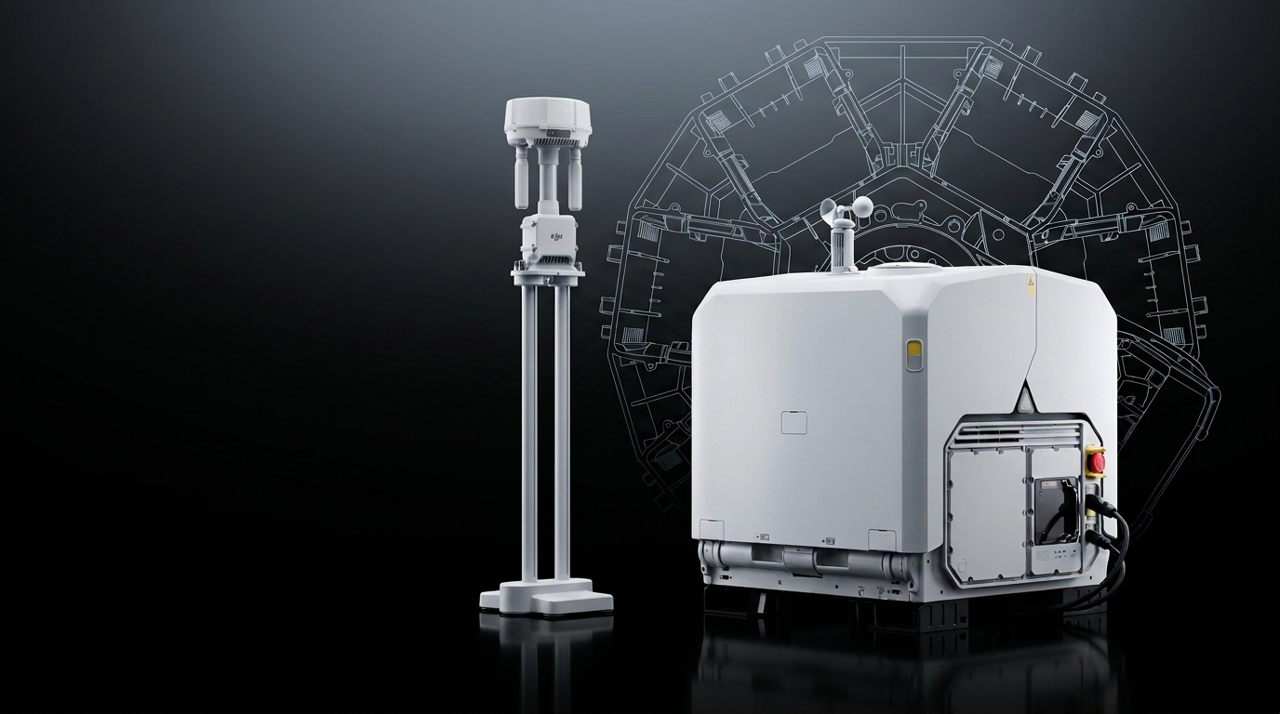
DJI presents Dock 4 as a complete dock-and-aircraft system rather than a charging upgrade for an existing Dock 3. Buyers should compare the full configuration, including aircraft, batteries, accessories, communications and software.
Dock 3 remains a known baseline. Its 55 kg dock operates from -30°C to 50°C at IP56. The IP55 aircraft has a published 54-minute maximum flight time and 10 km maximum operating radius under DJI's test conditions.
A faster dock does not automatically produce more useful coverage. Scope the aircraft endurance, ready-battery capacity, network design, payloads and CASA approval pathway together.
A 45-second operation gap is Dock 4's real generational change
Dock 3 waits for the battery to recharge; Dock 4 removes the depleted battery and inserts another.
Dock 4 lands and aligns the aircraft, rotates the hangar, removes the depleted battery and inserts another. DJI states under 25 seconds from the cover closing to the battery swap completing, and under 45 seconds from landing to the next take-off.
Dock 3 takes 27 minutes to charge from 15% to 95% at 25°C and cannot replace the battery. This is a change from recharge-and-wait to swap-and-dispatch.
| Turnaround measure | DJI Dock 3 | DJI Dock 4 |
|---|---|---|
| Charging method | Charges the aircraft battery in place | Battery swap plus wireless charging |
| Landing to next take-off | No published figure; set by the charge time below | Under 45 seconds |
| Battery charge time | 27 minutes from 15% to 95% at 25°C (battery in the aircraft) | 27 minutes from 15% to 95% at 25°C (battery in the dock) |
| Batteries held in the dock | None; one battery, in the aircraft | Up to 3, with 2 charging at once |
| Max media download | 20 MB/s | 80 MB/s over high-speed Wi-Fi after landing; 20 MB/s over O4 transmission |
The swap interval covers the change between aircraft operations. Ready-battery capacity, recharge speed and conditioning determine how long that tempo can be sustained.
Dock 4 changes the operating model, not just the turnaround time
The system is built around battery exchange, externalised communications and a new aircraft package.
Both generations use an IP56 dock, an IP55 aircraft and anti-ice propellers. The difference is cold-weather range: Dock 4 and the Matrice 5TD are both rated from -40°C to 50°C, while Dock 3 is rated from -30°C to 50°C and the Matrice 4TD from -20°C to 50°C. Check the component-specific temperature, wind, rain and icing limits when scoping a site.
A raised O4 Ground Station tackles the site, not just the signal
The separate O4 Ground Station places RTK and transmission hardware above obstructions. DJI lists up to 40 km transmission, sub-2G support and an RTK receiver that tracks five satellite systems across 19 frequencies. The 40 km figure is measured under the IC standard; under CE, which is the figure to use in Australia, the published maximum is 12 km, the same as Dock 3. Neither figure is an operating radius; the round-trip battery limit still governs the mission.
Dock 3 can also use an O4 Ground Station in supported gateway and relay modes. Compare the complete network design, not Dock 4's headline transmission number against an unassisted Dock 3.
Built-in dual 4G on the aircraft replaces the Matrice 4TD's add-on dongle
The Matrice 5TD has two built-in 4G modules running dual-SIM, dual-active backup transmission. The Matrice 4TD needs a separately sold DJI Cellular Dongle 2. At the dock end, both generations still use a Cellular Dongle 2; on Dock 4 it is installed in the O4 Ground Station. Carrier provisioning and failover behaviour should be included in the Australian network design.
176x hybrid zoom and native 1280 × 1024 thermal are the sensor headlines
Dock 4's aircraft is built to identify smaller details, at longer distance, in worse light.
The Matrice 5TD carries 50 MP wide-angle, medium tele and tele cameras, up to 176x hybrid zoom and an RYYB sensor for full-colour night vision. Its thermal camera has a native 1280 × 1024 sensor, with UHR Infrared Image mode output up to 2560 × 2048. The Matrice 4TD on Dock 3 has a native 640 × 512 thermal sensor, with UHR output up to 1280 × 1024. Compare native sensor with native sensor, and UHR output with UHR output.
| Imaging capability | DJI Dock 3 with Matrice 4TD | DJI Dock 4 with Matrice 5TD |
|---|---|---|
| Wide-angle camera | 48 MP, 1/1.3-inch CMOS, 24 mm equivalent, f/1.7 | 50 MP, 1/0.98-inch CMOS, 23.5 mm equivalent, f/1.8 |
| Medium tele camera | 48 MP, 1/1.3-inch CMOS, 70 mm equivalent, f/2.8 | 50 MP, 1/1.28-inch CMOS, 70 mm equivalent, f/2.88 |
| Tele camera | 48 MP, 1/1.5-inch CMOS, 168 mm equivalent; 16x digital, 112x hybrid zoom | 50 MP, 1/1.5-inch CMOS, 252 mm equivalent; 16x digital, 176x hybrid zoom |
| Max night scene ISO | 409,600 (wide-angle and medium tele); 819,200 (tele) | 1,638,400 (all three cameras) |
| Thermal sensor (native) | 640 × 512, 12 μm pixel pitch, f/1.0 | 1280 × 1024, 8 μm pixel pitch, f/0.85 |
| Thermal UHR output | 1280 × 1024 | 2560 × 2048 |
| Thermal measurement range | -40°C to 150°C (high gain); 0°C to 500°C (low gain) | -40°C to 150°C (high gain); 0°C to 550°C (low gain) |
| Laser rangefinder | 1,800 m normal incidence (20% reflective target); 600 m oblique (1:5) | 3,000 m normal incidence (25% reflective target); 1,200 m oblique (1:10) |
| Panorama (stitched) | 100 MP | Approx. 110 MP |
DJI demonstrates a vehicle plate at 400 metres and a screw at 100 metres, but these are examples rather than identification guarantees. For public safety and infrastructure inspection, the useful change is moving between context, identification and thermal evidence in one mission.
Built-in LiDAR and mmWave radar
The Matrice 4TD needs an add-on module for LiDAR and radar. The Matrice 5TD has both built in.
Both aircraft use an omnidirectional binocular vision system with a downward 3D infrared sensor. On the Matrice 5TD it is a colour vision system, and its measurement range increases to 25 m forward, backward and sideways.
The bigger change is LiDAR and mmWave radar. On Dock 3, the Matrice 4TD only gains them by fitting the optional Matrice 4 Obstacle Sensing Module, which occupies the aircraft's top E-Port. With the module fitted, operators cannot add a speaker, spotlight or parachute payload. The Matrice 5TD builds a horizontal rotating LiDAR and forward, upward and downward mmWave radars into the airframe, so every accessory position stays free.
| Obstacle sensing | DJI Dock 3 with Matrice 4TD | DJI Dock 4 with Matrice 5TD |
|---|---|---|
| Vision system | Omnidirectional binocular vision system | Omnidirectional binocular colour vision system |
| Vision measurement range | 20 m forward and backward; 16 m sideways | 25 m forward, backward and sideways |
| Rotating LiDAR | Optional Obstacle Sensing Module; 360° × 58° field of view; 100 m max detection | Built in; 360° × 59° field of view; 110 m standard range |
| mmWave radar | Optional Obstacle Sensing Module; 90° × 90° field of view | Built in, forward, upward and downward; 90° × 90° field of view |
| Port used by LiDAR and radar | Top E-Port, blocking other payloads | None; all three accessory mounting points stay free |
Detection range alone is not enough; validate performance against wires, moving objects, rain, fog and low-contrast surfaces. DJI also notes that when the AL2D Spotlight is on, the Matrice 5TD's visual obstacle sensing switches off and only the LiDAR and mmWave radar remain active.
A parachute, spotlight and loudspeaker can now fly together
The Matrice 5TD Accessory Mount provides three mounting points: the AL2D Spotlight on the right, the AS2D Loudspeaker on the left and DJI's new first-party AP1 Parachute on top. All three can be fitted at the same time, alongside the built-in LiDAR and radar. On Dock 3, the Matrice 4TD supports the AL1 Spotlight and AS1 Speaker, but fitting the Obstacle Sensing Module takes the top E-Port, so operators have to choose between LiDAR and radar or the extra payloads.
| Accessory | DJI Dock 3 with Matrice 4TD | DJI Dock 4 with Matrice 5TD |
|---|---|---|
| Spotlight | AL1 Spotlight; 32 W; 4.3 lux at 100 m | AL2D Spotlight; 48 W with spot and flood on; 11.2 lux at 100 m (spot) |
| Speaker | AS1 Speaker; 114 dB at 1 m; 300 m broadcast distance | AS2D Loudspeaker; 120.5 dB at 1 m; 400 m broadcast distance |
| Parachute | No first-party option; a parachute competes with the Obstacle Sensing Module for the top E-Port | AP1 Parachute; 35 m minimum deployment altitude; descent under 6 m/s |
| Fitted at the same time | Obstacle Sensing Module, or the speaker, spotlight and parachute payloads, not both | Spotlight, loudspeaker and parachute together, with LiDAR and radar built in |
The software layer may matter more than another camera
DJI is positioning Dock 4 inside a dispatch, evidence and integration workflow rather than as a stand-alone aircraft in a box.
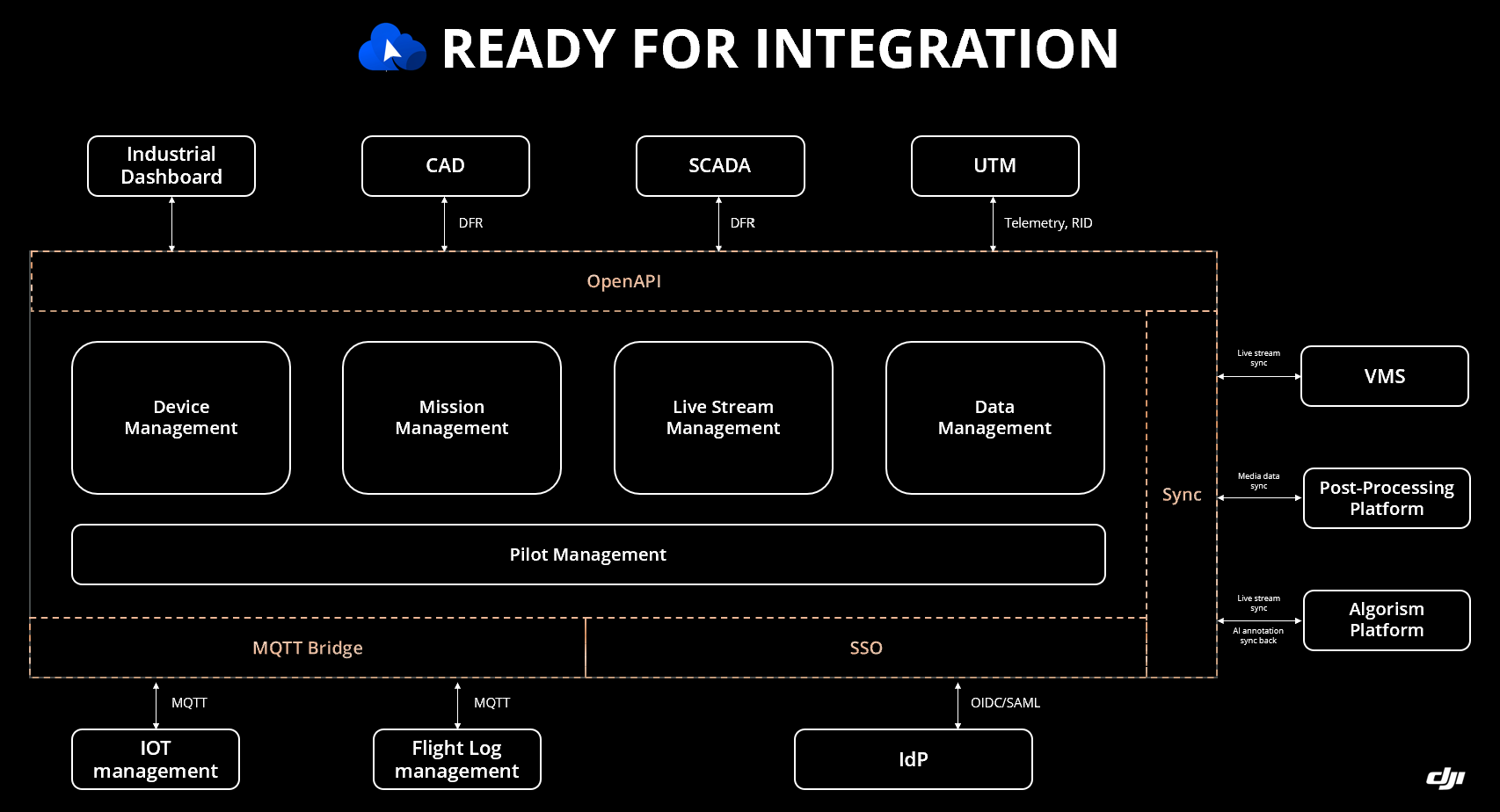
Both docks are managed in DJI FlightHub 2. DJI positions Dock 4 inside Dock as First Responder dispatch, OpenAPI 2.0, Analyzer Pro and Copilot workflows. Copilot creates routes from map locations and annotations, checks speed, altitude, collision and wayline validity, and keeps a human in the loop for live control.
DJI also shows evidence exchange with VMS, CAD and SCADA, plus SSO, MQTT, UTM and post-processing connections.
Some capabilities sit in FlightHub 2 or third-party systems rather than the dock itself. Confirm the required licences, regional availability and integration work when comparing configurations.
A simpler feature may be more useful: clicking a map point to retrieve matching photos and reduce the time between locating an issue and finding its evidence.
FlightHub 2 On-Premises keeps flight data on your own servers
For organisations that cannot send flight data to a public cloud, such as government agencies and critical infrastructure operators, DJI FlightHub 2 On-Premises runs the platform on the organisation's own servers, so live video, media and flight records stay under its control. Both Dock 3 and Dock 4 support it, and DJI also offers the FlightHub 2 AIO, an all-in-one server with the software pre-installed.
Prisma is DJI-certified to deploy FlightHub 2 On-Premises and can set it up, license it and support it in Australia. See our FlightHub 2 licences, On-Premises packages and AIO.
In Australia, a faster dock still needs an approved operation
Dock 4 can shorten the hardware delay between flights, but it does not shorten the regulatory pathway.
Most remote dock programmes are BVLOS because the pilot cannot maintain direct visual contact. CASA currently assesses them case by case, with an appropriate operating framework and qualified personnel.
Dock 4 highlights EU C5/C6, M2 mitigation, an independent flight termination system and a parachute. Australia has no equivalent class marking. These safety features may support a SORA-based case, but do not grant approval.
For the AP1 Parachute, DJI states a minimum 35-metre deployment altitude and descent under 6 m/s, with MOC 2512 and ASTM F3322 references. An Australian safety case still needs the relevant technical evidence and CASA acceptance.
The 40 km O4 figure (IC standard; 12 km under CE) is a communications claim, not an approval. Dock 4's height alert warns the operator; it does not authorise flight above 400 ft AGL or outside an approved volume.
Where the faster cycle would earn its keep
Emergency response: repeat launches, night vision, thermal evidence and dispatch integration suit law enforcement, fire and search and rescue.
Utilities: a rapid second mission can revisit an alarm while it is active. VMS and SCADA connections will require project engineering.
Survey-grade mapping: Dock 3 with the Matrice 4D remains the better fit, because the mapping camera matters more than a faster relaunch. See why below.
Choose Dock 4 when rapid relaunch changes the outcome
The right decision depends on whether Dock 3's 27-minute turnaround is a manageable scheduling constraint or a break in operational coverage.
| Your priority | Best fit | Why |
|---|---|---|
| Survey-grade mapping | Dock 3 with Matrice 4D | Its 4/3 mechanical-shutter camera is built for photogrammetry. Dock 4 only flies the Matrice 5TD. |
| Scheduled inspection | Dock 3 may be sufficient | The recharge interval can be planned around. |
| Repeated response missions | Dock 4 | Battery exchange reduces the gap between operations. |
| Higher-detail thermal and long zoom | Dock 4 | The new sensor package extends identification capability. |
| Lowest transition risk | Dock 3 | It is a mature platform with established workflows. |
| CAD, VMS or SCADA integration | Dock 4 | DJI positions it inside a broader response and evidence workflow. |
Dock 3 remains a capable platform: the Matrice 4TD has a 54-minute maximum flight time and a 10 km maximum operating radius under DJI's conditions, and Dock 3 supports vehicle mounting and multi-dock tasks. The Matrice 5TD on Dock 4 lists a 59-minute maximum flight time and the same 10 km radius. Dock 4 is the stronger choice where recharge time, sensor reach or system integration limits the mission.
For survey-grade mapping, Dock 3 with the Matrice 4D is the better fit
Dock 4 works only with the Matrice 5TD, an aircraft built for response and thermal work. Dock 3 can be paired with the Matrice 4D, the mapping version of its aircraft, and that camera is the reason to choose it for surveying.
- Mechanical shutter: the Matrice 4D's 4/3 CMOS, 20 MP wide-angle camera has a mechanical shutter (up to 1/2000 s), so photos taken while the aircraft is moving are free of rolling-shutter distortion. The Matrice 5TD's spec sheet lists no mechanical shutter.
- Mapping without ground control points: DJI states that only the Matrice 4D's 4/3 wide-angle camera supports mapping without GCPs, and that the Matrice 4D supports precise mapping with RTK enabled.
- Survey-friendly files: the Matrice 4D saves wide-angle photos as JPEG or DNG RAW, with an adjustable f/2.8 to f/11 aperture and 0.5-second interval shooting. The Matrice 5TD's visible cameras save JPEG only.
The Matrice 5TD can still map. DJI quotes 10 cm aerial-triangulation checkpoint accuracy at 120 m using 12 MP images, which is useful for progress tracking and situational maps, but survey work usually needs tighter accuracy. Routine survey flights are also easy to schedule around Dock 3's 27-minute recharge. See the DJI Dock 3 Autonomous Surveying & Mapping Hub.
Eight specifications decide whether Dock 4 changes the business case
The 45-second figure matters only when the rest of the system supports the required operating tempo.
- Battery system: ready-battery capacity, recharge time, conditioning and sustained mission rate.
- Compatibility: aircraft variants, controllers, accessories and software requirements.
- Flight performance: endurance, safe return radius, speed, wind and payload penalties.
- Installation: size, weight, power, backup, network and vehicle-mount requirements.
- Environment: component temperature ranges, rain, icing and battery-swap limits.
- Radio: the regional standard behind the range figure and Australian frequency support.
- Imaging: native detector resolution and the conditions behind long-range identification.
- Software: included features, optional licences and third-party integration work.
Dock 4: under 45 sec battery swap
Dock 4: 80 MB/s over Wi-Fi
Matrice 5TD: 176x
Matrice 5TD: 1280 × 1024
Matrice 5TD: 3,000 m
Matrice 5TD: 59 min
See DJI's Dock 3 specifications and Dock 3 FAQ for the released baseline. CASA publishes the current pathway for BVLOS operations.
DJI Dock 4 vs Dock 3 FAQ
What is the biggest difference between DJI Dock 4 and Dock 3?
Battery handling. Dock 3 recharges the battery in the aircraft; Dock 4 swaps it, with under 45 seconds from landing to the next take-off.
How fast can DJI Dock 4 relaunch the aircraft?
DJI states under 45 seconds from landing to the next take-off, and under 25 seconds from the cover closing to the battery swap completing. Ready-battery capacity and recharge throughput determine how long that tempo can continue.
Can DJI Dock 3 automatically replace the aircraft battery?
No. Dock 3 charges from 15% to 95% in 27 minutes at 25°C under DJI's test conditions.
Is Dock 4 just a battery-swapping Dock 3?
No. Dock 4 also introduces a new aircraft, the Matrice 5TD, with built-in LiDAR, mmWave radar and dual 4G; the O4 Ground Station; three accessory mounting points that take a spotlight, loudspeaker and the AP1 Parachute at once; and a broader response-software workflow.
Is Dock 4 thermal resolution four times higher than Dock 3?
Yes, comparing like with like. The Matrice 5TD's native thermal sensor is 1280 by 1024, four times the pixel count of the Matrice 4TD's 640 by 512 sensor. The same ratio applies to UHR output: 2560 by 2048 on the Matrice 5TD versus 1280 by 1024 on the Matrice 4TD.
Can DJI Dock 4 operate 40 km away in Australia?
No. The Matrice 5TD's maximum operating radius is 10 km, measured by DJI with a 15% safe battery reserve in windless conditions. The 40 km figure is a one-way transmission distance under the IC standard; under CE, the figure to use in Australia, DJI lists 12 km. A transmission headline is not an operating radius or a CASA approval.
Does DJI Dock 4 make BVLOS operation legal?
No. An accountable remote pilot and appropriate Australian approvals remain required. CASA assesses BVLOS operations case by case.
Should I buy DJI Dock 4 or Dock 3?
Choose Dock 4 when rapid repeated missions, longer-range identification, higher-detail thermal or deeper response integration affect the result. For survey-grade mapping, Dock 3 with the Matrice 4D is the better suited system: its 4/3 mechanical-shutter camera supports mapping without ground control points, and Dock 4 only works with the Matrice 5TD. Dock 3 also remains suitable when scheduled work can be planned around its recharge interval.
Scope the mission before choosing the dock
Prisma Technologies can compare response time, imaging, connectivity, software and the CASA pathway, then scope the complete Australian configuration around the work it needs to perform.
Request a consultation View DJI Dock systems Book a demonstration Drone training
Specifications and performance figures are sourced from DJI and measured in controlled conditions. Real-world results vary with aircraft configuration, payload, temperature, wind, network quality and mission profile. Regulatory information is general in nature and current at the time of writing. Confirm the Australian product configuration with Prisma Technologies and all operational approvals with CASA before planning a programme of works.
